What is Microsoft Teams Contact Center?

Optimize your business with a contact center

Contact center solutions allow your business to grow by saving time and resources, while simultaneously building brand loyalty.

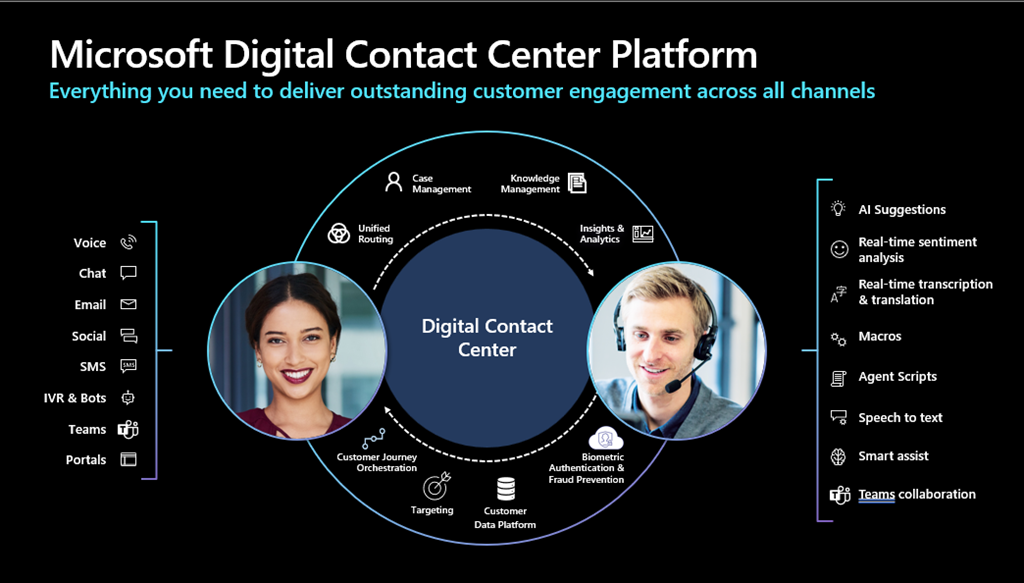
It’s important to understand that Microsoft Digital Contact Center Platform is not a single Product or SKU. It’s not a SaaS you buy “off the shelf”. The platform is more of a “playbook” or proposed architecture combining some or all of Dynamics 365, Nuance, Power Platform, Teams, and Azure.

Improve customer experience Strengthen your brand Keep a competitive edge Scale up

Why use a contact center?

Microsoft Digital Contact Center with teams

Microsoft Digital Contact Center with teams

The modular infrastructure of a contact center modernizes your business by boosting efficiency, security, and flexibility.

Save time

Increase efficiency and customer satisfaction by eliminating unnecessary dialogues.

Work smarter

Increase efficiency and customer satisfaction by eliminating unnecessary dialogues.

Improve customer experience

Enable digital engagement support via in-app chat, text, social media, and email for a smooth, seamless customer journey.


Strengthen your brand

Build lasting customer relationships by demonstrating your team is reachable, reliable, and committed to personalized problem solving.

Keep a competitive edge

Stay ahead of the competition with superlative service, since customer care is quickly overtaking product and price as the number-one differentiator.

Scale up

Omnichannel contact centers allow you to utilize data and analytics to adapt and scale your business to your customer’s needs.
https://149371380.v2.pressablecdn.com/wp-content/uploads/2022/07/image-13.png

How does Microsoft Digital Contact Center Platform for Microsoft Teams?

It’s important to understand that Microsoft Digital Contact Center Platform is not a “Teams Contact Center” in the sense that agents are not using Microsoft Teams. What Microsoft Digital Contact Center Platform does offer is the ability to communicate between Dynamics and Microsoft Teams, which allows:

  • With embedded Teams Chat a Dynamics agent to reach out to people in the organisation using Microsoft Teams to get additional support with a question or issue
  • Microsoft Teams users can also interact directly with Dynamics 365 records

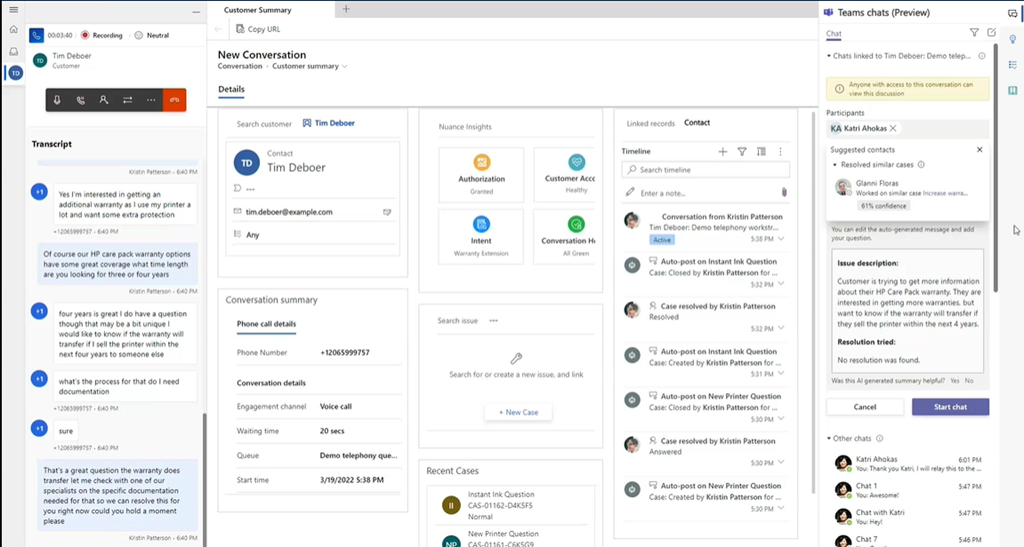
Embedded Teams Chat a Dynamics 365 and Swarming with Microsoft Teams
image

Based on the existing Agent/Customer conversation, AI can recommend people to collaborate within the organisation to help answer the question. AI can summarise the ask and send it out as a Teams message in the right pain of Dynamics. Note this is currently in Public Preview.

If you want a consulting, support and benefits on how to implement and get started with this solution for your business and development, contact us today:

Website: http://cybershop46.com
Call Us

Automated Backup /restores for Amazon RDS SQL Server

How to restore /backup AWS RDS SQL Server database

We all have been there where you get to know the pain of restoring a database from backups makes you hate all databases in the world, which is most the time not as easy as backing it up. To make things worse when I wanted to find a way to backup / restore AWS RDS database like my on premise SQL Server, I couldn’t find a flawless way to do it. If you are like me, who wants to do it with the best way possible, this is for you.


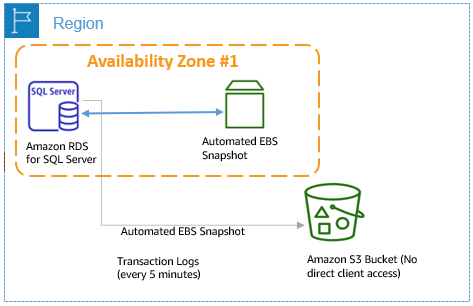
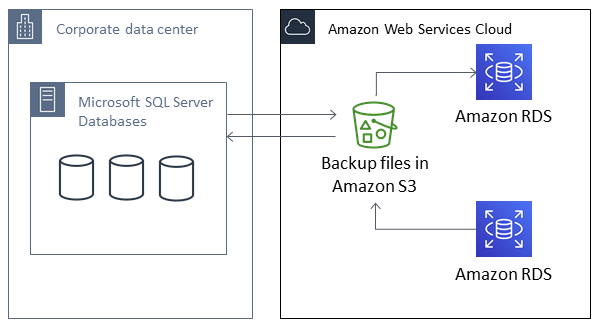
			Native Backup and Restore Architecture

Setting up for native backup and restore

To setup native backup for AWS RDS SQL Server, follow this steps we share you below.

To set up for native backup and restore, you need three components:

  1. The SQLSERVER_BACKUP_RESTORE option added to an option group on your DB instance.

  2. An AWS Identity and Access Management (IAM) role to access the bucket.
  3. An Amazon S3 bucket to store your backup files.

Create an option group to backup/restore database In option groups, click on Create Group.

Setting up for native backup and restore

You can settup native backup and restore with this 3 steps:

  1. The SQLSERVER_BACKUP_RESTORE option added to an option group on your DB instance.

  2. An AWS Identity and Access Management (IAM) role to access the bucket.

  3. An Amazon S3 bucket to store your backup files.

Create an option group to backup/restore database In option groups, click on Create Group.

To set up for native backup and restore, you need three components:

Give a name, description, engine and engine version. Here the engine should be the edition of your AWS SQL server instance. And the version should be same as the version you specified when you created the instance.

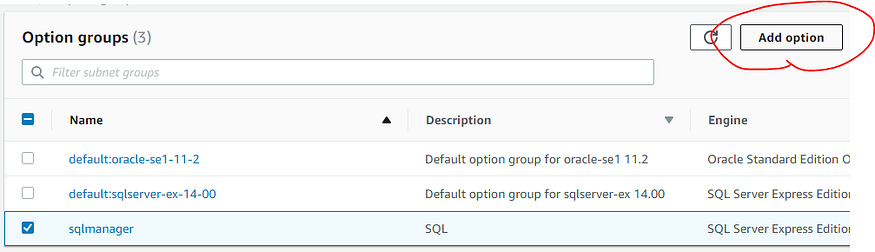
Now come back to RDS and select the newly created option group. Once the option group is created select it, and click on Add option.

Add option group to aws rds sql server

Add option group to aws rds sql server

In the next screen Select the option “SQLSERVER_BACKUP_RESTORE” from the drop down list. It should be already selected.

create option group to database

create option group to database.

create option group to database.

Down below, select the S3 bucket that you have created, Select “Yes” to “Apply immediately”. Then click “Add Option”.

You have to create a policy for the IAM Role: Backup-restore we have just created.

{
“Version”: “2012-10-17”,
“Statement”:
[
{
“Effect”: “Allow”,
“Action”:
[
“s3:ListBucket”,
“s3:GetBucketLocation”
],
“Resource”: “arn:aws:s3:::realworld-database”
},
{
“Effect”: “Allow”,
“Action”:
[
“s3:GetObjectAttributes”,
“s3:GetObject”,
“s3:PutObject”,
“s3:ListMultipartUploadParts”,
“s3:AbortMultipartUpload”
],
“Resource”: “arn:aws:s3:::realworld-database/*”
}
]
}

Create an iam role policy

Create an iam role policy

Now go the Databases, select the database that you want to get restored from the S3 bucket. Click on “Modify” from the upper right corner.

Add option grou to aws rds sql server database

The select apply immediately, to aplly the changes right now.

Now open up SQL Server Management Studio, Connect to your AWS RDS database instance and open a new query window.

Then Run this querys to backup / restore database:

SQL SERVER Query to backup the database:

exec msdb.dbo.rds_backup_database

               @source_db_name=’realworld’,

               @s3_arn_to_backup_to=’arn:aws:s3:::realworld/DataBase/backup.bak’,

               @number_of_files=1;


SQL SERVER Query to restore the database:

exec msdb.dbo.rds_restore_database

@restore_db_name=’realworld’,

@s3_arn_to_restore_from=’arn:aws:s3:::realworld/DataBase/backup.bak’;


SQL SERVER Query to verify if the task is running:

exec msdb.dbo.rds_task_status @db_name=’realworld’;

If you want a consulting, support and benefits on how to implement and get started with this solution for your business and development, contact us today:

Website: http://cybershop46.com

Call Us

Microsoft Entra Data Sheet


Security Code:
security code
Please enter the security code:

Submit

Odoo #1 Restaurants Management Software

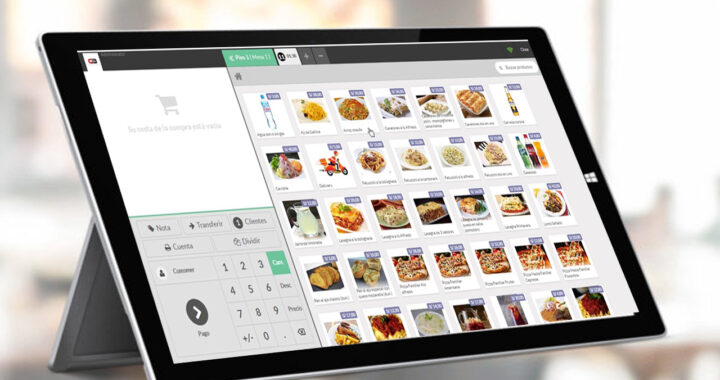
In an industry as fast-paced, and fast-growing, as the restaurant business, it’s important to find a point of sale (POS) software system that can keep up. Modern POS software has evolved into a tool that modernizes every aspect of the restaurant business, from customer experience to user experience and administrative tasks.

As you move through the process of evaluating POS software for your restaurant, there are some key factors to consider as you compare options. Think about how a new system will affect your customers, your staff, and your profitability. Test or demo every solution that makes your shortlist, and look for the features that matter most to your team.

Odoo POS Software

Pay particularly close attention to the following five areas:

1. Customer Experience & Software Speed.

2. User Experience

3. Data Access & Control

4. Inventory

5. Reporting

Odoo Restuarant software - Inventory Module

You can’t be at the restaurant 24/7, but with an older desktop-based system, you might feel like you have to be. That’s an especially annoying problem when you just need to make a small schedule or menu update, and you have to trek in on a weekend or late at night.

When considering a POS for your restaurant, keep these points top of mind during your evaluation process.

Looking for specific restaurant management software?

  • Point of Sale System
  • Restaurant Reservation Software
  • Table Management System
  • Food Costing Software
  • Inventory Management System
  • Waitlist Software
  • Restaurant Accounting Software
  • Cash Flow Management Software
  • Online Ordering Software
  • Restaurant Analytics Software
  • Restaurant Menu Builder Software
  • PMS Integration Software
  • Additional Restaurant Management Software

If you want a free consulting and benefits on how to implement and get started with this solution for your business and development, contact us today: Website: http://cybershop46.com
Call Us

Odoo Restaurant Software
Tips for cyberattaks

5 tips to keep your business secure from cyberattaks.

Tips for cyberattaks

Tips for cyberattaks

Hardening of systems:

Hardening, in computing, translates into securing a system by limiting its surface of vulnerability; the more functions a system performs the more open it becomes and therefore, more vulnerable to possible attacks.

  • Keep software& hardware up-to-date:

Software companies typically provide software updates for 3 reasons: to add new features, fix known bugs, and upgrade security.

Always update to the latest version of your software to protect yourself from new or existing security vulnerabilities.

  • Patch Devices and antivirus:

You can significantly reduce your vulnerability by ensuring you have an anti-virus, at least one anti-malware installed on your computers, keep pathing and up to date your devices like PCs, Mobiles, Servers, Handhelds and tablets.

  • Enable Multi-Factor authentication:

While having a strong password is the first step to secure your data; however, passwords will not be of any help in case of a keylogging attack. A key logger is used to monitor and record each keystroke typed on a specific computer’s keyboard. In case of such attacks, the strength of the password is made ineffective and it is easy for the attacker to steal your credentials. “Enabling a two-factor authentication helps in mitigating this risk to maximum extent possible,” assures Thapar.

  • Backup your Data:

Important data can be lost as a result of a security breach. To make sure you’re prepared to restore data once it’s lost, you should ensure your important information is backed up frequently on the cloud or a local storage device.

Bonus Tip:

A business continuity plan (BCP) is a document that consists of the critical information an organization needs to continue operating during an unplanned event.

The BCP states the essential functions of the business, identifies which systems and processes must be sustained, and details how to maintain them. It should consider any possible business disruption.

Tips for cyberattaks

Tips for cyberattaks

If you want a free consulting and benefits on how to implement and get started with this solution for your business and development, contact us today: Website: http://cybershop46.com

Call Us

Why Odoo is Disrupting th ERP Industry?

Why Odoo is Disrupting the ERP Software Industry?

While open-source ecosystems provide businesses the flexibility to customize the software to fit their specific needs, it also requires a certain level of technical expertise to do so.  Odoo ERP Software is constantly evolving, businesses need to be prepared to keep up with the latest changes to take full advantage of the software.

Flexibility :

Odoo is an extremely flexible system. Unlike other ERP software, Odoo can be customized to fit the specific needs of any business – regardless of size or industry. And because Odoo is open source, businesses have full access to the source code and can make changes as they see fit. This level of customization is simply not possible with other ERP solutions on the market.

Scalability :

Another advantage of Odoo is its scalability. Odoo can be scaled up or down to meet the changing needs of a business as it grows. This makes it an ideal solution for businesses that are looking to expand , add logic business rules and features in the future. With other ERP solutions, businesses often have to purchase additional licenses or modules as they grow, which can be costly and time-consuming. By choosing Odoo, businesses can cut down on these costs and ensure that their operations are always aligned with their current needs.

This phased approach is the polar opposite of many other ERP systems that require an entire suite or package of expensive and complex systems. Odoo, on the other hand, can accommodate businesses of all sizes and industries because it can be personalized to fit their unique needs.

Odoo ERP Software is an extremely flexible system.

Odoo ERP Software is an extremely flexible system.


Cost:

Odoo is also much more cost-effective than other ERP solutions, and ther are very transparents with their prices. Because it is open-source, businesses only have to pay for the modules they need – and they can even develop custom modules if they so choose. Odoo is a great option for businesses with low budget.

Transparency:

Odoo is very transparent throughout the purchasing process with very few hidden costs. This makes it easy for businesses to budget for their Odoo implementation and ensures that there are no surprises down the road.

Ease of Use:

Odoo is designed to be easy to use, even for businesses with little or no experience with ERP systems. The user interface is intuitive and easy to navigate, and Odoo’s online documentation is clear and concise. This makes it easy for businesses to train their employees on how to use Odoo, and helps reduce resistance to change.

Integrate:

Odoo is designed to be easy to integrated with any hardware (Printers, Handhelds, Cameras, Sensors), and for hardware not supported you can buy the Odoo Iot Box.

Pos and Kichen Printer

odoo can integrate wwith Pos and Kichen Printer

handheld for WarehouseOdoo iot box


Bar Code printers

Odoo CRM Software

Call Us

Digital Transformation Strategy

Design a winning move for your Company with Digital Trans

How to design a winning move?

In the digital economy, every company benefits from using digital technologies, including powerful machines. The key is to design organizational structures at the intersection of humans, machines, software, Hardware and Digital Transformation Strategy.

  1. Classify the organization into 3 clusters: automation, augmentation, and amplification. Start by systematically examining the tasks, processes, and jobs carried on inside the company, the key partners’ organizations, and the ecosystems. Identifying which of them are—or could be—automated, augmented, or amplified with machines is the first step to taking advantage of the possibilities.
  2. Benchmark the 3 clusters against industry incumbents and digital companies. Look at what others in the industry are doing (particularly with automation), what other similar companies are doing (particularly with augmentation), and what experiments are being carried out with big data and cognitive computing. Are there experiments with new technologies or in other industries that might be instructive?
  3. Refine and revise the 3 clusters. Keep reviewing not only the potential of new powerful machines but the human talent that’s working with them. Assess the skill set that is pushing the innovation in this area, and find a way to acquire it.
  4. Reframe the human talent profile. Create a business that allows employees to frame and solve big problems. Only a small percentage of workers may be superstars whose output and value are truly exceptional. But create the environment for them—and average employees (2/3 to 3/4 of the company’s hires)—to work with powerful machines. Only then can they compete (and cooperate) with talent working for digital giants and tech entrepreneurs.

Remember, the 3 winning moves are not independent. Orchestration and participation define how companies work across ecosystems to capture value, build capabilities, and work together to solve big problems. They guide where to play and how to play. Coopetition is about who to play with to create more value and get a fair share of it. Using robotics and artificial intelligence to augment and amplify human talent creates companies that are more attractive to potential partners and more relevant in the digital economy.

Three questions are important:

  1. What tasks could be automated, requiring little human intervention? The goal is competitive efficiency and effectiveness for routine tasks. A company that automates faster than its competitors, and across a wider range of tasks, will have a competitive edge. Think not only payroll accounting but tracking cars on the road and monitoring their performance in real time.
  2. What processes could be augmented with smart assistants? The goal is to add value by sifting through volumes of data, pulling out key numbers and ideas, and using algorithms and actions with analytics to draw key insights. A company that mines its data more broadly and deeply than its competitors, and over a longer period of time, will have a competitive advantage. Think carrying out first-order diagnostics for cancer based on established criteria or evaluating bids for new TV shows based on past viewing habits.
  3. What jobs could be amplified with active interactions between humans and machines? The goal is to take advantage of complementarity (areas in which machines are superior to humans) and singularity (areas in which intelligent machines can progressively interpret new information and redesign themselves accordingly). A company whose employees work at the frontier of machine technology to create and capture value more quickly with machines will have outperform those that don’t. For more on what this future might look like, read “Amplify Human Talent with Powerful Machines
Digital transformation of the warehouse
Amazon TechnolgyIf you want a free consulting and benefits on how to implement and get started with this solution for your business and development, contact us today: Website:  http://cybershop46.com
Restaurant Software

5 Keys to Choosing POS Software for Your Restaurant

In an industry as fast-paced, and fast-growing, as the restaurant business, it’s important to find a point of sale (POS) software system that can keep up. Modern POS software has evolved into a tool that modernizes every aspect of the restaurant business, from customer experience to user experience and administrative tasks.

As you move through the process of evaluating POS software for your restaurant, there are some key factors to consider as you compare options. Think about how a new system will affect your customers, your staff, and your profitability. Test or demo every solution that makes your shortlist, and look for the features that matter most to your team.

Odoo POS Software

Pay particularly close attention to the following five areas:

1. Customer Experience & Software Speed.

2. User Experience

3. Data Access & Control

4. Inventory

5. Reporting

Odoo Restuarant software - Inventory Module

You can’t be at the restaurant 24/7, but with an older desktop-based system, you might feel like you have to be. That’s an especially annoying problem when you just need to make a small schedule or menu update, and you have to trek in on a weekend or late at night.

When considering a POS for your restaurant, keep these points top of mind during your evaluation process.

If you want a free consulting and benefits on how to implement and get started with this solution for your business and development, contact us today: Website: http://cybershop46.com

3 Benefits of AWS API Gateway

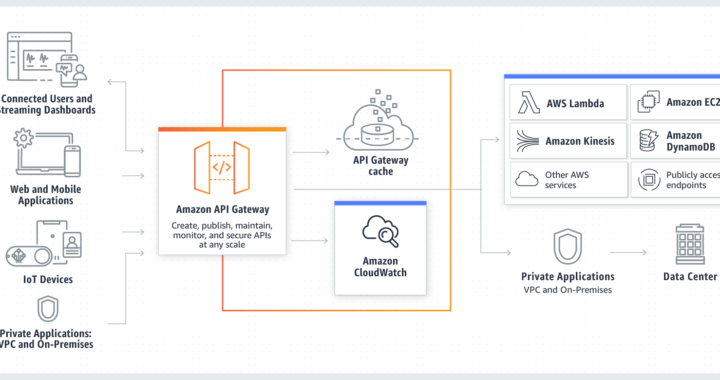
Amazon API Gateway is a fully managed service that makes it easy for developers to create, publish, maintain, monitor, and secure APIs at any scale. APIs act as the “front door” for applications to access data, business logic, or functionality from your backend services. Using API Gateway, you can create RESTful APIs and WebSocket APIs that enable real-time two-way communication applications. API Gateway supports containerized and serverless workloads, as well as web applications.

3 Benefits for your Business

Cost savings & Performance at scale

API Gateway provides a tiered pricing model for API requests. With an API Requests price as low as $0.90 per million requests at the highest tier, you can decrease your costs as your API usage increases per region across your AWS accounts.

Provide end users with the lowest possible latency for API requests and responses by taking advantage of our global network of edge locations using Amazon CloudFront. Throttle traffic and authorize API calls to ensure that backend operations withstand traffic spikes and backend systems are not unnecessarily called.

RESTful API options & Efficient API development

Create RESTful APIs using HTTP APIs or REST APIs. HTTP APIs are the best way to build APIs for a majority of use cases—they’re up to 71% cheaper than REST APIs. If your use case requires API proxy functionality and management features in a single solution, you can use REST APIs.

Run multiple versions of the same API simultaneously with API Gateway, allowing you to quickly iterate, test, and release new versions. You pay for calls made to your APIs and data transfer out and there are no minimum fees or upfront commitments.

Easy monitoring

Monitor performance metrics and information on API calls, data latency, and error rates from the API Gateway dashboard, which allows you to visually monitor calls to your services using Amazon CloudWatch.

What is Amazon Web Service Api Gateway?

Amazon API Gateway is an AWS service for creating, publishing, maintaining, monitoring, and securing REST, HTTP, and WebSocket APIs at any scale. API developers can create APIs that access AWS or other web services, as well as data stored in the AWS Cloud

. As an API Gateway API developer, you can create APIs for use in your own client applications. Or you can make your APIs available to third-party app developers. For more information, see Who uses API Gateway?.

API Gateway creates RESTful APIs that:

  • Are HTTP-based.
  • Enable stateless client-server communication.
  • Implement standard HTTP methods such as GET, POST, PUT, PATCH, and DELETE.

Get started with Amazon API Gateway

If you want a free consulting and benefits on how to implement and get started with this solution for your business, contact us today:

Website: cybershop46.com/

Call: +1(508)5074189

Whatsapp: https://wa.me/message/4V7G2LIOS63UN1

More Information about AWS Api Gateway:

https://docs.aws.amazon.com/apigateway/latest/developerguide/welcome.html

Why Odoo is Disrupting th ERP Industry?

What is the function of an ERP or what is an ERP?

We are immersed in a global era in which technologies are part of our daily lives and within the business sector, they are considered a fundamental resource for the development of productive and economic processes that lead companies to renew their action model towards one more automated and improved.

However, by technological resources it is often thought that we refer to state-of-the-art machinery and devices, but in reality, it is even more than that because what companies are requiring today are specialized systems that adapt to their particular needs.

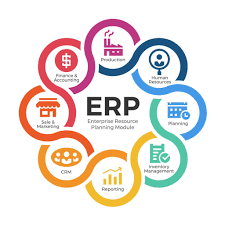
We are talking about ERPs, Enterprise Resource Planning for its acronym in English, which means Enterprise Resource Planning System. They are advanced technological solutions that help manage the daily activities of a company covering each of the areas (sales, accounting, supply chain, inventory, warehouse production, etc.).

An ERP system fulfills various functions: planning, predicting, controlling, budgeting, projecting business processes, which it manages to integrate from a single digital platform that provides a broad view of each action that is carried out and promotes an optimal flow between them.


Video: